• Download and Watch without watermark videos -- (HERE)

  • Download Indiasocialbook Android Native App (HERE)

Best Video Editing Softwares

Video editing software is quickly emerging as a must-have investment in today’s digital world. You don’t need to be a professional videographer or editor to appreciate the features of a great program. Video editing tools are also excellent for things like posting on Instagram, creating product videos, or sharing streams on YouTube.

Fortunately for today’s creatives, video editing software is easy to come by. There are all kinds of great products out there to help you make the most of your clips. Unfortunately, figuring out what kind of tool you should be spending your money on can be a little complicated.

Today, we’re going to be looking at the best video editing software options, to help you make the right choice.

What Makes a Great Video Editing Software?​

There’s no one-size-fits-all when it comes to video editing technology. It all depends on what you’re going to be using your software for. Some people need a video editing solution capable of applying filters to video content and getting rid of unwanted mistakes. Others need a video editor capable of chopping through clips and splicing them together.

A few of the crucial aspects you should look for include:

  • Downloadable or online: Some video solutions allow you to upload your content into a browser-based application for editing purposes. Others require a download. Both solutions are suitable for a range of editing needs, but downloadable products are often more comprehensive.
  • Ease of use: All editing software will have a learning curve to consider, but some tools are definitely easier to use than others. A great way to make sure you’ll feel comfortable using your chosen software, is to look for tools with plenty of documentation, guides, videos, and community support to help you.
  • Available features: What do you need to do with your video editing software? Most solutions will come with a range of features, such as the ability to change aspect ratios, add filters and overlays, or implement text and captions into your videos. Some tools will come with scene transitions, stock audio and other functions too.
  • Budget: The more affordable the video conferencing technology, the more likely it is you’ll need to compromise on things like advanced features. It’s important to find something that matches your budget, while still giving you the right functionality.
  • File formats: A good video editing software should allow you to access videos in a range of formats and save your finished projects in the right file type. Access to a selection of available format should make it easier to upload your videos to your required platform.

Best Video Editing Software Tools​

Now you know the basics of what to look for in your video editing software, let’s take a look at some of the tools most likely to grab your attention in the current landscape.

1. Adobe Premiere Pro​

Best for professional editing & best overall video editor​

View attachment 1280

PROS

  • Extensive professional features for photo editing
  • Create and edit your photos in various file formats
  • Access all the features of the Creative Cloud for touch-ups
  • Frequently updated feature set
  • Filters, adjustments, and fixes

CONS​

  • Takes a while to learn
Widely regarded as the industry standard for video editing software, Adobe Premiere Pro has a huge selection of features to choose from. Whether purchased as a standalone product or as part of the Adobe Creative Cloud, Premiere Pro is a feature-rich and powerful tool for professionals. Routinely used for the creation of short films, TV shows, and YouTube videos, this app does it all.

Access to a host of smart tools in an ever-evolving portfolio means Premiere Pro users can easily design and edit 4K, 8K, and even VR videos to suit different needs. You can create and change videos in a host of different formats and save your file however you choose. There’s also access to other Creative Cloud apps, so you can easily access photos, effects, and other tools.

Premiere Pro also comes with access to Premiere Rush, an all-in-one app for all devices which allows users to film and edit on their smartphone and publish straight to social channels.

Pricing

Pricing for the Standalone Premiere Pro service starts at around $20.99 per month with an annual commitment, or $31.49 monthly. Alternatively, you can access Premiere Pro as part of the Creative Cloud, with a package starting at $52.99 per month.

Try Adobe Premiere Pro

2. Corel VideoStudio Ultimate​

Best video editing software for Corel users

View attachment 1281

PROS​

  • 4K video editing and 360-degree videos
  • Powerful color grading and video masking
  • Optimized performance for all video formats
  • Excellent user interface with straightforward features
  • Ideal for all kinds of users

CONS​

  • Layering can be a little complex
Corel VideoStudio Ultimate, now in the 2022 version, is a simple and immersive video editing tool, ideal for Windows users. The service allows you to transform your movies and clips with intelligent tools, premium effects, video masking, and color grading. You can even implement edits to improve video performance too.

The solid and affordable video editing software features a clean, reliable, and straightforward user interface, making it easier for people from all backgrounds to get started. Once you master the basics, you can explore more advanced tools like 4K video editing, 360-degree videos, and motion tracking. There’s also support for adding music and 3D text for captions.

Though Corel VideoStudio is a little tricky to use at first with layers, if you’ve never used a similar service before, it’s one of the tools available with a much lower learning curve than things like Adobe Premiere Pro.

Pricing

Corel VideoStudio’s pricing starts at around $59.99 thanks to a limited-time 25% off sale. However, the Corel team are constantly implementing new sales to help you save cash.

Try Corel VideoStudio

3. Adobe Premiere Elements​

Best for beginners

View attachment 1282

PROS​

  • Professional advanced video editing features
  • Wide range of animations, effects, and artistic elements
  • AI Sensei technology for better quick-fire editing
  • Fantastic constantly updating a set of capabilities
  • Powerful layering options

CONS​

  • Requires practice to use effectively
Before you assume we’re just mentioning the same app twice, Adobe Premiere Pro and Adobe Premiere Elements are actually two different tools. Premiere Elements offers a convenient and extensive all-in-one video editing experience for today’s professionals, with access to AI through Adobe Sensei technology.

Adobe Sensei means you can easily edit and organize your video content with AI suggestions to help eliminate dark spots, blurry parts, and other errors in your video. Designed to bring all kinds of video content to life, Adobe Premiere Elements has built-in effects, animations, artistic elements, and a host of other amazing features to explore.

Though it does take a while to get your head around all the functionality available from Premiere Elements there are a lot of documents and guides to help you.

Pricing

Not available as part of Creative Cloud, Adobe Premiere Elements starts at around $99.99. You can also get the service combined with Photoshop Elements at a discount.

Try Adobe Premiere Elements

4. CyberLink PowerDirector 365​

Best for ease of use

View attachment 1283

PROS​

  • Excellent motion tracking and stabilization features
  • Lightning-fast rendering and video stabilization
  • Advanced features and 360 video creations
  • Multi-cam designer functionality
  • Access to simple social media tools

CONS​

  • Some features are trickier to use than others (e.g. blurring)
Cyberlink PowerDirector is one of the most popular video editing software solutions on the market today. If you’re looking to edit components of professional videos, or you want to make your YouTube clips look more amazing, this could be the tool for you. The software comes with tons of great tools for cutting, refining, and adding effects to your content.

Offering an intuitive workflow, so anyone can access advanced features and bring their videos to life, the Cyberlink solution is a great choice for a range of users. You’ll even have access to advanced features like intuitive motion tracking, mask designer tools and dynamic keyframe controls.

Customizable vector shapes mean you can add various unique customizations to your videos, while animated titles help you to attract audience attention. You can even change the aspect ratio of videos rapidly for easier uploading to social media channels.

Pricing

PowerDirector from Cyberlink starts with a subscription cost of $19.99 per month. You can access a free trial to check out some of the services, but there’s no full free version.

Try CyberLink PowerDirector

5. Wondershare Filmora​

Best for editing on a budget

View attachment 1284

PROS​

  • Easy to use for beginners
  • Tons of great tools for social media videos
  • Easy to resize and adapt your content for different platforms
  • Extensive free version for testing functionality
  • Lots of animations, filters, and effects

CONS​

  • May be a little limited for more professional videos
Ideal for creating social media and online videos, Wondershare Filmora is an easy-to-use and reliable video editing tool. Despite a relatively low price tag, Filmora is surprisingly feature-rich, with access to things like motion tracking and custom animations to bring your videos to life. If you’re creating content for YouTube, you can even use suggested effects, filters and titles.

Filmora comes with access to a robust library of sound effects and videos to give your content more of an impact. Plus, there are tools to simplify uploading to different social platforms too. Auto reframing functionality allows you to instantly redesign your video in specific aspect radios.

The free version of Filmora includes most of the same tools as the premium version, but there is a watermark. Still, we’d recommend checking out the free version to see what you get.

Pricing

Pricing starts at around $51.99 per year if you want to be able to access constant updates and new versions of the software, or you can buy one version outright.

Try Wondershare Filmora

6. Clipchamp​

Best for team projects

View attachment 1285

PROS​

  • Excellent easy-to-use templates and tools
  • Clean and simple environment for tracking projects
  • Cloud media backups and unlimited exports
  • Great for working on projects with teams
  • Video, image, and audio stock, as well as great templates

CONS​

  • Free version only offers 480p exports
Clipchamp has a unique approach to video creation in a digital world, with tools like ClipChamp Teams, so collaborators can work together on the same piece of content without having to waste any time. The solution is easy to use and brimming with helpful features, like access to solutions like the Facebook Video Ad Marker to help you create social media ads.

Customizable video templates are included within the application, so you can start creating even when you’re struggling to think of ideas. Simple add text to your canvas and implement your content, and you’ll be ready to go. With a clean and simple interface, ClipChamp takes the stress out of creating videos for today’s busy business marketing managers.

Trim and cut, split, and combine, flip and mirror, and rotation features mean you can adjust your videos however you choose. To take your videos to the next level, there’s access to color editing options, filters, and text-adding capabilities too.

Pricing

There’s a free version of Clipchamp supporting 480p exports. The cheapest paid plan is $9 per month for 720 exports, or you can pay $19 per month for full HD exports. The Business Platinum version of the package at $39 pre month is the most advanced.

Try Clipchamp

7. Pinnacle Studio Ultimate​

Best video editing software with add-on options

View attachment 1286

PROS​

  • Affordable one-time purchase
  • Access to advanced features like motion tracking and split-screen
  • Dynamic range of cinema-grade tools for production
  • Multi-cam editing and keyframe controls
  • Easy enough to use for beginners

CONS​

  • Purchase doesn’t come with unlimited updates
Now in version 25, Pinnacle Studio Ultimate is an ideal video editing solution for beginners and intermediate users searching for fast and effective video editing software. The program, which comes to us from Corel, makes it easy to advance your editing skills with state-of-the-art advanced tools. You can create 360 videos, access video masking, and use smart object tracking to maintain focus.

The Ultimate solution comes with powerful color grading, dynamic split-screen videos for eye-catching advertisements, stop motion animation, and even screen recording. You can also experiment with a host of editing tools like motion tracking, video stabilization, multicam editing, keyframe controls, and title editing.

One of the most advanced video editing solutions not offered by Adobe, Pinnacle will help all kinds of branded content make the right impression in the video landscape.

Pricing

Pinnacle Studio Ultimate is surprisingly affordable at only $129.95. You only need to pay for your software once, so there’s no subscription headache to worry about.

Try Pinnacle Studio Ultimate

8. Final Cut Pro X​

Best for Mac users

View attachment 1287

PROS​

  • Excellent timelines and organization features
  • Access to third-party proxy creation
  • Accelerated performance with amazing technology
  • Filters, audio effects, and more
  • Multiple file types to edit in

CONS​

  • No automatic updates because you only pay once
Final Cut Pro X is a video editing tool created by the Apple team – so you’ll need a Mac to access it. The solution provides everything users need for professional video editing, including a high-performance engine for editing, audio, and motion graphics.

Apple’s video editing solution comes with a one-time purchase option, so you can avoid spending a fortune on recurring payments. Magnetic timelines and grouping tools are also a huge benefit of this system, as they make it easier to manage your creative works.

There are tons of great tools to choose from within Final Cut Pro X, including a host of filters, audio effects, and proxy creation, so you can view your video on third-party devices. Accelerated performance with Metal also means you can code your videos faster too.

Pricing

Final Cut Pro X is an app on the Apple store available for a single one-time purchase of $299. Although this might sound quite expensive at first, you only have to pay once.

Try Final Cut Pro X

9. Apple iMovie​

Best free video editing app for Apple users

View attachment 1288

PROS​

  • Free to use for Apple users
  • Fantastic range of editing and filter features
  • 4k video support and green screen
  • Suitable for cross-device editing
  • Easy to use interface

CONS​

  • Missing some more advanced features like layers
If you’re looking for a simple approach to video editing that works seamlessly with your existing iOS or Mac device, iMovie is a great choice. This simple and effective product is free to use, and it’s great for creating high-quality Hollywood-style videos with ease. You can even design and edit 4K video clips on your smartphone.

The iMovie solution makes it quick and easy to manage edits across multiple devices, so you can start on your iPhone, move to your iPad and end up on your desktop. The software includes a series of high-fidelity filters for a more memorable finish, extra-special effects, and more than 80 smart soundtracks.

iMovie also comes with watermarks, background color selection, captioning, and text boxes, so you can bring your content to life in a variety of different ways. With an easy-to-use interface that doesn’t take long to learn, this app is sure to appeal to countless creatives.

Pricing

Free for Mac users

Try Apple iMovie

10. Vimeo Create​

Best for quick editing

View attachment 1289

PROS​

  • Easy to use web-based editor
  • Convenient if you don’t have a lot of space on your PC
  • Templates and formatting for social media
  • An affordable way to edit content
  • Marketing tools included

CONS​

  • Not as advanced as desktop-downloadable software
Offering a host of simple editing features for social media videos and clips, the Vimeo Create application is a convenient, web-based editor. For beginners, there’s not much of a learning curve to worry about, so you can jump in and start creating straight away. Vimeo’s solution doesn’t have the power of a desktop solution, but you can access it on any computer, which is convenient.

There are templates, so you don’t have to start creating from scratch, and you can customize various aspects of your video. Vimeo gives you the freedom to add unique fonts, change the layout of your content, add a logo, or customize your colors. You can also upload your finished videos straight to the social media platform of your choice, with formatting for every channel.

Although you can’t mess around with things like layers on Vimeo Create, you can access unique features, like marketing tools to help you track the impact of your video.

Pricing

To access Vimeo Create, you’ll need Vimeo Plus, starting at $7 per month when you pay annually or $12 per month when billed monthly

Try Vimeo Create

Best Business VoIP Software Providers

The best VoIP providers can help your company build a more efficient, reliable, and cost-effective communication strategy. For years, demand for VoIP (Voice over Internet Protocol) has accelerated as companies have searched for more agile and flexible tools for global communications.

Today, the VoIP market is set to reach a value of around $145.8 billion by 2024, building from a value of $69.3 billion in 2020, at a CAGR of 20.4%. Perfect for today’s digital-first landscape and hybrid work environment, VoIP software allows individuals and companies alike to place calls over an internet connection, keeping costs low, while maximizing signal strength and voice quality.

For most brands today, the question isn’t whether VoIP is a necessary investment, but which VoIP providers can they trust to deliver the best results.

Today, we’re sharing our list of the most valuable VoIP providers, to help you make that choice.

What Are The Best Business VoIP Providers?​

1. Ooma​

Best Overall VoIP Service​

View attachment 1270
Ooma is an affordable, flexible, and reliable solution for business-quality VoIP. With various plans to choose from, the Ooma Office solution promises simple communication solutions for a wide range of businesses, no matter their size or background.

Ooma specializes in offering customizable communication packages, with the option to integrate voice with messaging and video, for a complete Unified Communications as a Service experience. The basic plan comes with access to a range of features as standard, including a mobile app, virtual receptionist, and even call-forwarding. You can also leverage feature-rich Enterprise functionality, depending on the size of your organization.

Key Features​

Ooma offers everything the modern business needs to succeed in the world of flexible VoIP. You can access a comprehensive cloud phone system, hosted PBX functionality, and softphone access, all designed to suit the unique requirements of your brand. Depending on the package you choose, you’ll also have access to video conferencing tools and collaboration apps.

Ideally suited to companies with remote workers, Ooma comes with both mobile and desktop apps, which allow staff to receive unlimited calls in the US with their business number. There’s also the “Ring Groups” feature, which allows teams to group extensions together, so they ring at the same time. Ooma is simple, effective, and ideal for rapid communications.

Integrations​

Ooma can integrate naturally with a variety of different tools, including Zendesk, Zoho CRM, Salesforce, G-Suite, and Microsoft Dynamics.

Ooma Pricing​

Pricing depends on the needs of your business. You can use a pay-as-you-go plan with minute costs per country, or access 200 minute international plans starting at $5.99 per month. Contact the Ooma team to get a full quote for your VoIP service.

Try Ooma

2. Nextiva​

Best All-in-One Solution​

View attachment 1271
One of the world’s top-rated business phone solutions, Nextiva makes it quick and simple for businesses to digitally transform their communication strategy. If you’re looking for an all-in-one service for cloud-based communication, Nextiva definitely has you covered, with flexible pricing plans and a reliable level of international call quality.

Nextiva built its VoIP solution for the age of modern workers, where hybrid and remote employment is becoming increasingly common. The company has earned the name of “Best Business Phone System” from a number of publications and has a proven reliability of 99.999% uptime.

Key Features​

The Nextiva ecosystem allows you to communicate with customers on a range of channels, including WhatsApp, and connect your team members in a shared cloud environment. You can also set up automations to help minimize repetitive tasks and make your staff more efficient.

Call features include everything from a unified communications environment with video, chat, and VoIP in one space, to integrations with helpdesk software and sales CRM. You can also access unlimited calling, texting, and faxing worldwide, with free toll-free calls, virtual voicemail, and auto attendant access too.

Integrations​

Nextiva can integrate with a range of applications including HubSpot, Salesforce, Oracle, Zendesk, Zoho, and Microsoft Dynamics. There are dozens of available integrations in total.

Nextiva Pricing​

Pricing starts with the Essential communications plan at $14.95 per user per month for unlimited voice and video calling, auto-attendant, and toll-free numbers. You also get voicemail to email notifications, and 24×7 customer service on the basic plan.

Try Nextiva

3. Grasshopper​

Best for Solo Entrepreneurs​

View attachment 1272
Business calls don’t have to be complex; Grasshopper is a convenient tool for solo entrepreneurs designed to add business lines directly to your personal phone. You can add a complete virtual phone system to your existing phone, to keep your costs as low as possible, even if you’re a freelancer. Plus, there are various phone number options to choose from.

You can save money on your communications, while still creating a highly professional and sophisticated image for your brand. Grasshopper numbers can work from virtually anywhere, with local, and toll-free numbers available. You also get 24/7 support from the customer service team included on every plan, no matter how affordable your package is.

Key Features​

Grasshopper delivers an excellent VoIP service for smaller firms with limited financial resources. You can either import an existing number for your business number, or choose from a range of toll-free, vanity and local numbers embedded into your existing phone system. All you need to do is add your reliable internet connection and a handset.

There aren’t any analytics included with your Grasshopper plan, but you can still access an unlimited number of business calls and texts, as well as call forwarding options and powerful 24/7 support. If you’re looking for a simple way to start communicating with customers while keeping your personal and professional numbers separate, this could be it.

Integrations​

You can integrate your Grasshopper system with a range of mobile and desktop devices, as well as Google Voice, Skype, and various other common business tools.

Grasshopper Pricing​

Pricing for Grasshopper starts at around $26 per month to add a business line and virtual phone system to your personal phone. You can also save extra money by porting your existing number into Grasshopper and choosing an annual plan.

Try Grasshopper

4. RingCentral​

Best for Small Businesses​

View attachment 1273
RingCentral is a versatile provider of cloud-based solutions for communication and customer service. The company can offer businesses either simple business phone connections, or a comprehensive unified communications as a service solution known as RingCentral MVP.

This cloud-based PBX platform combines messaging, video and phone functionality into one convenient package, enhanced by collaboration tools and AI. RingCentral has even earned a position as a leader in the Gartner UCaaS Magic Quadrant, highlighting it’s impact in the industry. Compared to the other leading business VoIP phone services out there, RingCentral is one of the most affordable solutions making it a great choice for smaller teams.

Key Features​

RingCentral MVP offers a host of amazing features to suit different business needs, including a comprehensive auto-attendant system, a company directory, call handling and forwarding, and various extension options. There’s also a powerful 99.999% uptime SLA, which means you get the peace of mind of knowing you’ll have minimal disruptions to your calls.

With RingCentral, businesses get access to a state-of-the-art service experience, with 24-hour support, integrated solutions for business growth and real-time analytics. You can even make the decision to combine your RingCentral phone system with contact centre functionality for an all-in-one cloud environment for communications.

Integrations​

RingCentral can integrate with a wide variety of partners, including Google, Salesforce, and Microsoft. There are more than 200 integration options in total.

RingCentral Pricing​

Pricing options start at around $10 per user per month, depending on the kind of functionality you need. The best way to get an accurate quote is to contact RingCentral.

Try RingCentral

5. CloudTalk​

Best for Call Centers​

View attachment 1274
CloudTalk is an innovator in the cloud contact center environment, ideal for companies making the transition into a more flexible environment for customer contact. The brand serves a host of major companies around the world, including Mercedes Benz and DHL, so you know you’re in good company if you’re working with this vendor.

The CloudTalk solution can offer a total of more than 140 national phone numbers, making it an excellent pick if you need to create a local experience within an international brand. You can also access a range of bonus features for making your team more effective, like the ability to track and record your calls automatically.

Key Features​

CloudTalk comes with a host of features to make call centers more productive, including the ability to access real-time analytics on the performance of your agents. You can also connect your entire remote team to the same contact center, where they’ll be able to interact with customers through a shared inbox, reducing the need for transitioning between apps.

With a globally-renowned level of network strength, CloudTalk also promises businesses the peace of mind they need when it comes to delivering consistently great customer experience. The service represents one of the fastest-growing cloud phone system solutions in the world today.

Integrations​

CloudTalk can integrate with a range of leading tools including Pipedrive, Salesforce, HubSpot, Zendesk, and more. You can access immediate insights from your CRM in your contact centre.

CloudTalk Pricing​

Pricing starts at around $25 per user per month month if you commit to an annual plan. There are also more expensive plans if you need more tools, like a real-time client dashboard.

Try CloudTalk

6. Dialpad​

Best for Remote Workers​

View attachment 1275
Dialpad is a communications solution built for the cloud, and perfect for the age of remote and hybrid work. This cost-effective VoIP solution is ideal if your team members are going to be using softphone applications rather than desk phones in a standard office environment. The fast and efficient calling solution is perfect for boosting flexibility anywhere.

With Dialpad Talk, the central VoIP solution from Dialpad, business leaders gain access to efficient cloud-based communications team members can access anywhere. There’s also built-in AI functionality to boost employee productivity, and ensure your teams stay reliable.

Key Features​

Promising powerful global connectivity, Dialpad gives business leaders all the flexibility they need to develop a scalable ecosystem for communication. Members of staff can work from anywhere using any device to power their conversation, without having to compromise on performance or security features, and user setup is easy too.

Dialpad also includes a central administrator portal which makes it easy to add new users and assign phone numbers to them directly. There’s also a convenient range of reporting and analytics features so you can keep track of your team members and their performance wherever they are.

Integrations​

Integrations are available with a range of office suites like Microsoft 365 and Google Workspace, as well as multiple CRM tools.

Dialpad Pricing​

Pricing for the standard plan starts at $15 per user per month with unlimited calling and SMS included as standard. You also get voicemail transcription in this plan.

Try Dialpad

7. Freshdesk​

Best Helpdesk Solution​

View attachment 1276
Freshdesk is best known for offering helpdesk tools and solutions to ensure companies can run more powerful customer service strategies. The VoIP phone system from Freshworks, known as “Freshcaller” is a convenient part of this ecosystem. You can use Freshcaller to deliver sensational customer service and keep teams connected through cloud-central communications.

Freshcaller is an actually an integration for the full Freshdesk experience, which you can add into your Freshdesk package at any pricing structure, except for on the free plan. You’ll also be able to track important information in this ecosystem and get reports on employee activity.

Key Features​

More than just a VoIP solution, Freshdesk is a comprehensive selection of customer support tools, including intuitive ticketing, seamless self-service tools, and more, delivered at an affordable cost. The Freshdesk environment comes with advanced automations available to help streamline your team’s performance, and powerful reporting features too.

Not only can you manage calls and customer conversations with Freshdesk, but you can also align your teams around a shared strategy for success, with priority ticket queues and routing. There’s even a single view environment for all conversations.

Integrations​

Freshdesk can integrate with more than 1000 tools, including solutions for gamification, CRM tracking and artificial intelligence.

Freshdesk Pricing​

You’ll need at least the Growth plan from Freshdesk to access the VoIP functionality available from the FreshCaller add-on. This starts at around $15 per user, per month.

Try Freshdesk

8.​

Best Consumer VoIP App​

View attachment 1277

Best Consumer VoIP App​

Google Voice is a simple but effective part of the Google Workspace environment, which allows business users to add phone calling functionality to all of their devices in a matter of seconds. You can access the service either as a business, or for personal use, and unlock a range of powerful features, including high security standards and enterprise phone numbers.

The Google Voice environment comes with an easy-to-use interface designed to ensure anyone on your team can adopt your Voice technology with minimal training. You can assign numbers and port various numbers conveniently in the same unified environment.

Key Features​

Designed to help team members work more effectively from anywhere, Google Voice offers a customizable environment which can adapt to suit anyone’s needs. You can control your Voice phone numbers and other features within the Google Workspace admin console, and users can access the functionality on a range of devices.

Voice comes with smart tools like Google Meet and Calendar, so you can easily track calls and plan upcoming meeting. It’s also quick and easy to scale the system when you need to add new team members into your ecosystem.

Integrations​

Google Voice can integrate with anything that integrates with the Google Workspace environment, which includes quite a lot of software options.

Google Voice Pricing​

The cheapest package for Google Voice includes access to the full Google Workspace, and 2TB of cloud storage per user. The Business Standard package starts at $10.87 per month.

Try Google Voice

9. Bitrix24​

Best Workspace Solution​

View attachment 1278
Bitrix24 isn’t your standard VoIP service. Rather, this solution promises an all-in-one environment for everything from customer relationship management, to task and project tracking. Promising the “ultimate workspace”, Bitrix24 has virtually everything a modern business might need to stay ahead of the curve in the current digital landscape.

Over 10 million organizations have chosen the Bitrix24 solution for their company today, and the service is currently available in 18 languages, making it one of the more diverse options on the market. The features include everything from website building tools, to HR and workflow automation.

Key Features​

There are too many features in Bitrix24 to mention completely here, as the workspace solution really does combine a huge number of different capabilities. You’ll have access to online meetings, chats and video calls, online payments, a contact center environment, CRM tools, Task management, SEO-friendly website building and a comprehensive knowledge base builder.

There’s also access to online documents, synchronized calendars, a comprehensive Google analytics integration, absence management, an employee directory, and so much more. If you want an all-in-one software solution, this is definitely the product for you.

Integrations​

Bitrix24 integrates with various tools including Google Calendar and Drive, Microsoft Office, LibreOffice, Dropbox, Box, and Mailchimp.

Bitrix24 VoIP Pricing​

Pricing starts at $39 per month for up to 5 users, with access to chat, video calls, calendar functionality, knowledgebase creation and more.

Try Bitrix24

10. 8×8​

Best for Customization​

View attachment 1279
Named a Magic Quadrant Market Leader for UCaaS 9 times in a row, the 8×8 eXperience Communication platform is one of the most flexible in the current landscape. Designed to suit the needs of a wide range of different businesses, 8×8 provides a highly modular solution to communication, which companies can customize however they see fit.

With 8×8, you don’t get a one-size-fits-all solution for business communications. Instead, you can build the perfect ecosystem for your needs, combining chat, video, messaging, voice, and even contact center functionality into the same convenient package.

Key Features​

8×8 is a comprehensive provider of reliable business phone functionality, as well as contact center tools, video meetings, messaging, collaboration, and more. Every package comes with access to the tools you need to connect your team members, and you can add in extra features whenever you like, thanks to the scalable landscape.

The 8×8 ecosystem also comes with highly secure and fully-redundant data centers, as well as award-winning voice quality regardless of whether you’re in the office or on the go. A single administration platform makes managing the technology easy, and there’s a range of powerful analytics too.

Integrations​

8×8 can integrate with everything from Microsoft Teams, to your existing CRM system.

8×8 Pricing​

Pricing for 8×8 can start as low as $14 per user per month.

Try 8×8

Business VoIP Providers Buyers Guide​

What is VoIP and How Does it Work?​

VoIP or Voice over Internet Protocol is a technology solution which enables companies to transmit their voice communications as well as other media packets through an internet connection. This is a convenient solution to the standard telephone network.

VoIP technology works similarly to a conventional phone system, but it’s much more affordable in most cases, easier to scale, and more suitable for global communications.

Why Your Business Needs a VoIP service​

VoIP technologies come with a range of benefits you just can’t access with a traditional phone system. With VoIP, you can make and receive calls from almost any device, in any location, provided you have your own internet connection. You can also connect with colleagues through any device.

VoIP technology also allows companies to connect with customers and other brands around the world for a much lower price than having to call people from the standard Public Switched Telephone Network. With VoIP systems, you can access a range of advanced features, from intelligent call routing to video and audio conferencing for collaboration purposes.

What To Look For In The Best Business VoIP Providers?​

Different companies will have unique requirements when it comes to VoIP technology, some of the most common things you should look for include:

  • SLA uptime agreement: A standard uptime agreement of 99.99% or above offers peace of mind for business owners who can’t afford to miss out on calls.
  • Video and collaboration tools: Video conferencing features and collaboration tools offered alongside your VoIP technology helps to keep hybrid teams connected.
  • Voicemail: Some high-end VoIP solutions include speech-to-text voicemail and voicemail transcription features.
  • File and screen sharing: Tools to support teams in the remote working landscape are becoming increasingly popular with VoIP systems.
  • Integrations: Integrations with your preferred CRM tools, workforce productivity tools and other essential apps could be essential.
  • Call monitoring: Call monitoring, recording, and even advanced call routing functionality will help you to run a compliant business more efficiently.
  • Call management: Various forms of call management tools will be crucial, like on-hold music and messaging, call “hold” options, and call queuing.

500GB pCloud for 3 months

▪️ GET | 20$
??‍♂️ pCloud is the cloud storage program for anyone looking for a complete storage solution » The easy-to-use interface provides the user with all the brilliant multitasking features for both business and personal use.

PROMO : PHOTOMANAGERS

??‍♂️ WHAT TO DO:
1. Open » pCloud.
└ Login/Register
2. Enter promo code (see above).
Windows / Mac / iOS / Android
3. Done, use pCloud.
└ 90 days subscription

IVPN Pro for 1 month (every month)

View attachment 772

IVPN is an independently audited, open source, privacy-focused VPN service with strong security measures and a Double VPN feature, meaning traffic goes through 2 servers" available for the following countries: Russia, Ukraine and Belarus, meaning you just fill out form, expect an email with a promotional code and get Pro-functions for 1 month.

You can use VPN to get VPN :LOL: , but it seems to me that they don’t track much and the conditions are a formality, so try to get it.

---------------------------------------------------------
▪️ APPS:
iOS | Android | Windows | Mac
---------------------------------------------------------
WHAT DO WE HAVE TO DO:
1. Open » IVPN.
└ Fill out the form
2. We expect about 48 hours.
└ We were answered in 15 minutes
3. Done, use it.

1657284934764.png

Headspace for 1 year

▪️ iOS / Android | 150$
??‍♂️ Headspace is your guide to mindfulness in everyday life, learn meditation and mindfulness skills from world-class experts like former monk and Headspace co-founder Andy Puddicombe. Choose from hundreds of guided meditations on everything from managing stress and everyday anxieties to sleep, concentration, and health of mind and body.

??‍♂️ WHAT TO DO:
1. Open » Tines × Headspace.
└ Enter mail and Linkedln
2. We are waiting for a letter by mail.
└ Done, use 1 year

The letter does not arrive immediately, you will have to wait about 3-7 days, after the specialist checks the application - you will be sent an email with instructions to activate the subscription for 1 year.

SkillShare Premium for 3 months

265798_1.jpg


▪️ GET ACCESS
??‍♂️ SkillShare Premium is a platform created for online training of creative people, the main categories of courses it offers are: art, design, business, lifestyle, technology » we will help you get 3 months of subscription to your or new account.

This is not a referral link, I found codes on one site that give 3 months.
--------------------------------------------------
PROMO CODE : QvX40u
--------------------------------------------------
??‍♂️ WHAT TO DO:
1. Open »SkillShare.
└ Login/Register
2. Enter the promo code (see above).
└ Done, use it.

Get Paid Udemy Courses for Free - Lifetime Access

Get paid Udemy courses for free with lifetime access!

Learn from paid Udemy courses for free and get a professional certificate to showcase your ability! About Udemy: Udemy is the online learning destination that helps students, companies, and governments gain the skills they need to compete in today’s economy.

Resources:

https://discudemy.com

About DiscUdemy:

DiscUdemy is a Free Udemy Coupons site. Find best Udemy Promo Codes and Deals on their website and get the best saving on your online learning. Unlike most Udemy Free coupon providers; Discudemy team cleans all expired coupons and keeps only active coupons for us.

I believe you will be able to use the resources to learn new skills and get better with your professional living!

Addtional Source :

https://www.real.discount/

SiteBook Pro

logo-white2.png

headline1.png


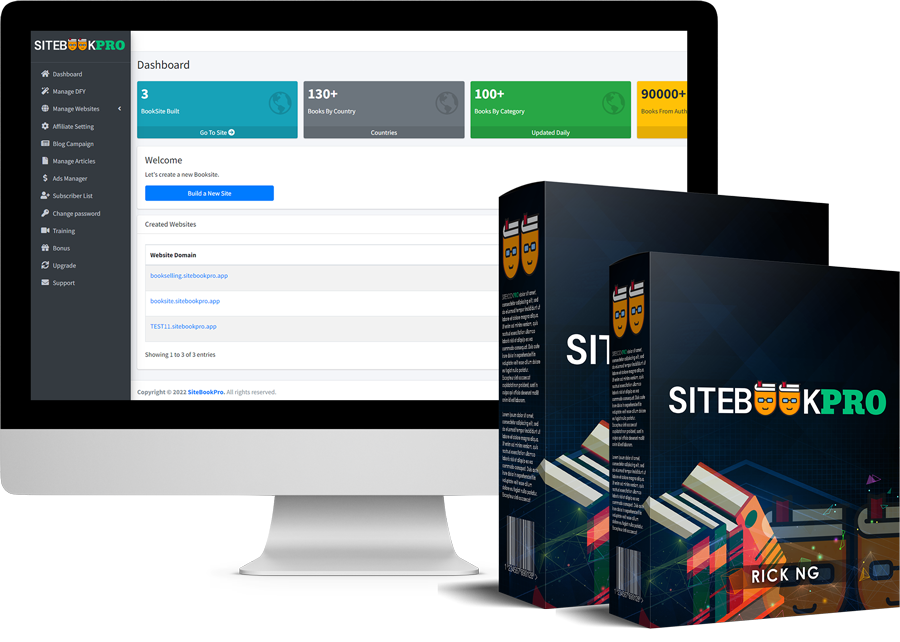
Instantly Load 90,000+ ebooks, physical books & audiobooks under 130+ categories in just a click… automatically embedded with your affiliate link - so you get paid instantly!

  • Just ONE Click To Activate Your Own Book Affiliate Site…
  • Get Started Immediately To Make Your First Book Affiliate Sale
  • Pay Once, Profit Forever Without Any Restrictions
  • 100% Hosted On Reliable Cloud Server & Optimized For Seamless Mobile Usage
  • Age, Skill & Experience - No Bar
  • 59 Beta Testers Have Made $52,589 In Affiliate Commissions With SiteBookPro…
  • 100% Legal & Ethical…
  • 30 Day Money Back Guarantee…

SiteBook Pro is The Ultimate Book Affiliate Site Builder To Help You SkyRocket Profits At The Lowest One-Time Cost

mockup4.png

Sales Page: https://getsitebookpro.com/live

Access:
[HIDEREPLY]
Couponify
[/HIDEREPLY]

Filter